Donate Box Event Types
The donate box isn't just for cash donations — when a Twitch or YouTube event comes in (a subscription/membership, a resub, a follow, Bits, or a gifted sub), the same box changes its text to match the event automatically. No more "donated 0฿".
It uses the same preset you already picked — no extra overlay or tab needed.
What it does
- Renders each event type in a Thai+English mix (e.g. "สมัคร Sub แล้ว!", "Cheer 500 Bits", "มอบ Gift Sub")
- Hides the amount for events that carry no number (Sub / Follow) — never shows a bare 0
- Money-themed presets (Bank Slip / Arcade / Trading Card / Minecraft) reframe their headline/label to fit the event — e.g. the Bank Slip shows "สมาชิกใหม่!" instead of a 0-baht transfer slip
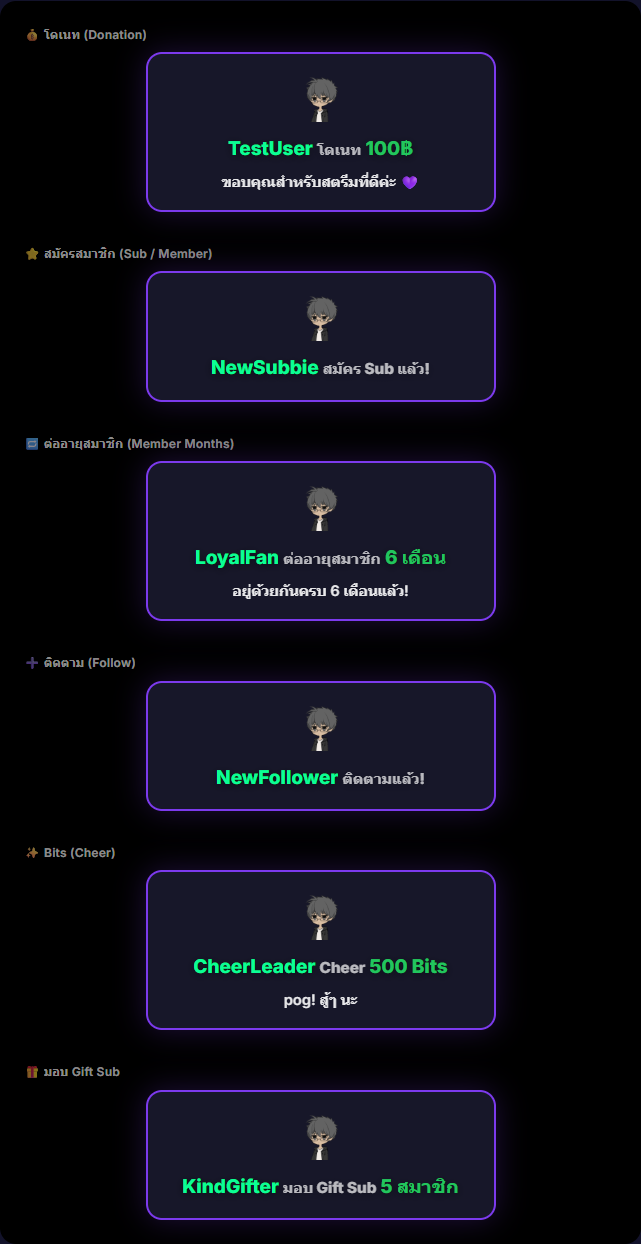
- Preview shows all 6 event types at once — see exactly how the chosen preset looks for every event
Supported event types
| Type | Comes from | Example text on the box |
|---|---|---|
| 💰 Donation | Streamlabs / EasyDonate / YouTube Super Chat | TestUser โดเนท 100฿ + message |
| ⭐ Sub / Member | Twitch Sub / YouTube Membership | NewSubbie สมัคร Sub แล้ว! |
| 🔁 Resub (Months) | Twitch Resub / YouTube Milestone | LoyalFan ต่ออายุสมาชิก 6 เดือน |
| ➕ Follow | Twitch Follow | NewFollower ติดตามแล้ว! |
| ✨ Bits (Cheer) | Twitch Bits | CheerLeader Cheer 500 Bits |
| 🎁 Gift Sub | YouTube Gift Membership | KindGifter มอบ Gift Sub 5 สมาชิก |
Want each event to play a different alert sound too? Set it up in Alert Sounds — map a sound per event type.
Where to find it
Settings → Overlay → Donate Box — pick a preset, then hit Pin or Preview to see all 6 event-type boxes.
Use case
A streamer connected to Twitch wants viewers to instantly know when someone subscribes or sends Bits — no extra setup, just pick a preset and the box shows the right text per event. Open the Preview before going live to confirm every event looks right.