Ko-fi Webhook
Connect Ko-fi to the app via a webhook to receive donations and subscriptions in real time, feeding the same queue as your other sources for TTS + overlay. Multi-currency (USD/EUR/JPY, etc.) is converted to THB automatically — great for international audiences (Ko-fi has no PromptPay).
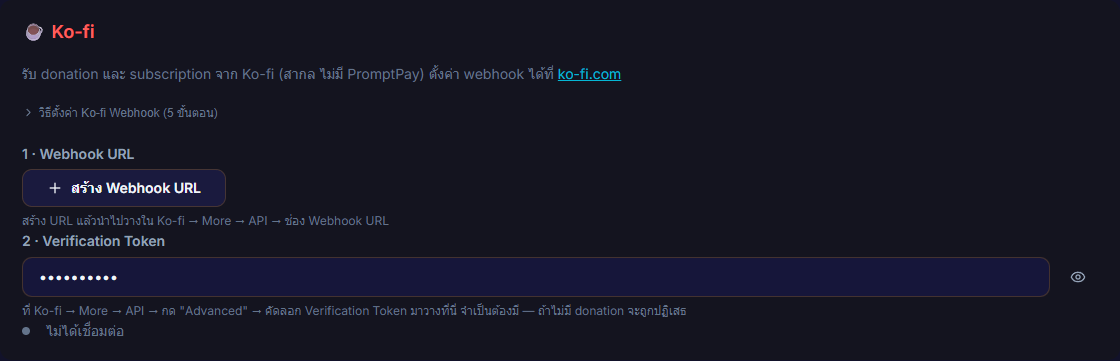
Setup has two parts for security: a Webhook URL (generated in the app) + a Verification Token (copied from Ko-fi) — you need both before it counts as Connected.
What it does
- Receives donations / subscriptions from Ko-fi via webhook (donor name / message / amount / currency)
- Feeds the unified donation queue — read by TTS and shown on the overlay, just like your other sources
- Multi-currency → THB conversion, automatically
- Generate / Regenerate Webhook URL right inside the app — if the URL leaks, regenerate to revoke the old one
- Shows Connected / Disconnected status + the time of the last received webhook
Where to find it
Settings → Connections → ☕ Ko-fi
Inputs / configurable settings
- Webhook URL — generated in the app (shown only once, copy it before leaving the page), then pasted into Ko-fi → More → API → Webhook URL
- Verification Token — copied from Ko-fi → More → API → Advanced and pasted into the app. Required — without it, donations are rejected.
Outputs / what happens
- Connected / Disconnected status + "Last received: …"
- Only Tip / Donation / Subscription events fire an alert (Commission / Shop Order are skipped)
- Donation events queue automatically and flow to TTS + overlay (amount shown in THB after currency conversion)
Notes
:::warning Always paste the Verification Token If you set only the Webhook URL but leave the Verification Token empty, donations are rejected immediately and Ko-fi does not retry — that donation is lost. Set both before going live. :::
- Two-factor auth: the token in the URL (routing) + the Verification Token (proves the payload really came from Ko-fi)
- No PromptPay — Ko-fi takes international cards/transfers; best for overseas audiences
- Donor email / shipping address is PII — the app never stores or logs it; only the name / message / amount / currency are used
Use case
A streamer with an international following who collects through Ko-fi — generate the Webhook URL in the app, paste it into Ko-fi, then copy the Verification Token back into the app. From then on every tip / subscription flows into the same pipeline as your other sources, read by TTS with an overlay alert, with the currency converted to THB automatically.